# KMIP key server
Storage appliances that encrypt data — a Synology NAS, a TrueNAS box, a vSphere
cluster — need somewhere to keep the encryption keys. Keeping them on the same
appliance that holds the encrypted data defeats much of the point: whoever walks
off with the box gets the lock and the key together. The industry answer is
**KMIP** (Key Management Interoperability Protocol), the OASIS standard those
appliances speak to an external key manager.
RemotePower ships one. It is **off by default** and runs as a separate,
sandboxed sidecar service, so nothing listens until you ask for it.
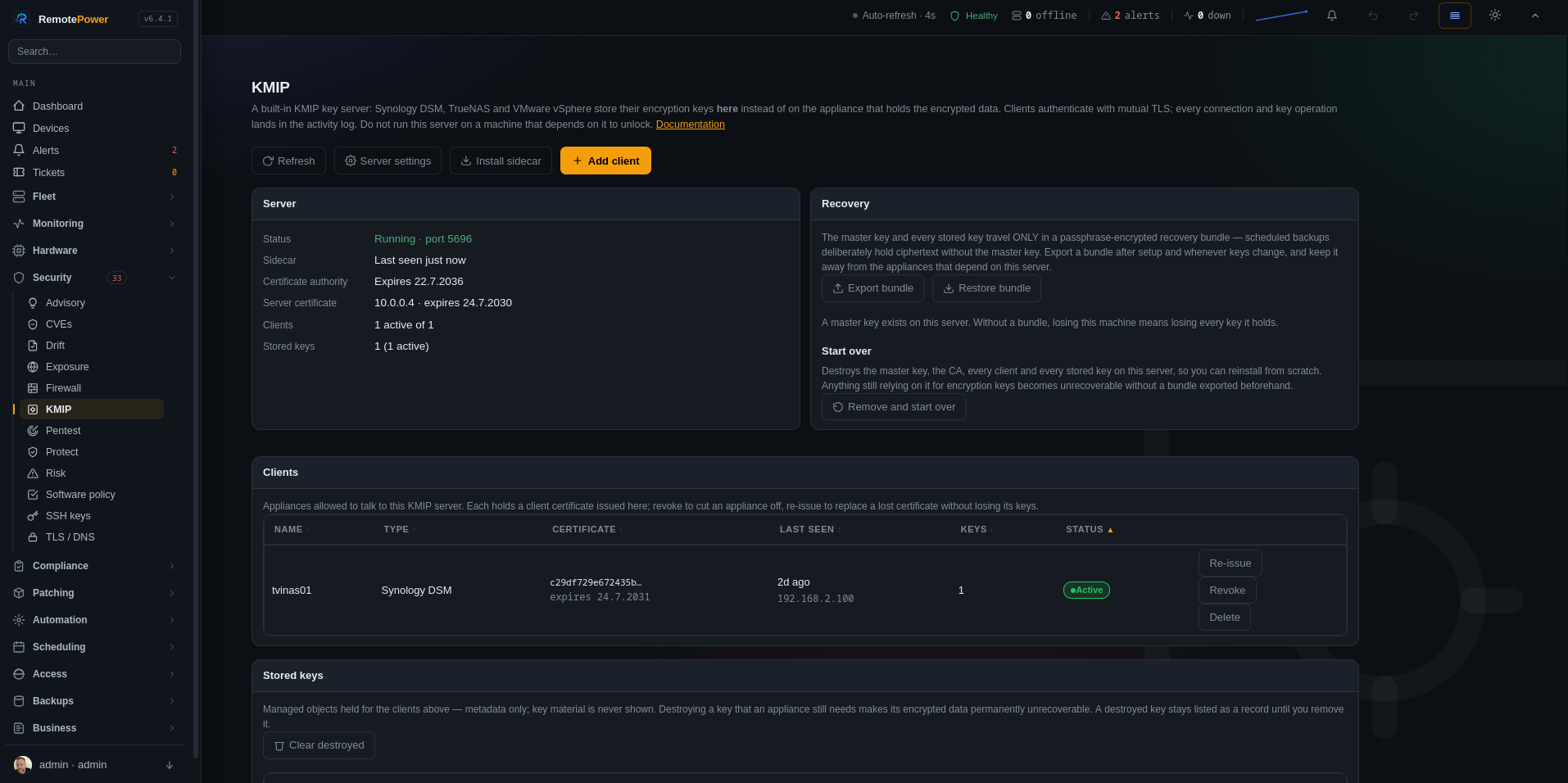 > **Read this before you enable it.** Once an appliance stores its keys here, it
> needs this server reachable **at its own boot time** to mount encrypted
> storage. Never run the KMIP server on a machine that depends on it to unlock —
> a NAS that keeps its keys on a VM hosted by that same NAS will not come back
> from a reboot. Export a recovery bundle (below) before you rely on it.
## What speaks to it
| Client | What it stores here |
|---|---|
| **Synology DSM** 7.2+ | Encrypted shared-folder / volume key vault |
| **TrueNAS** (CORE / SCALE) | SED passwords and ZFS dataset keys |
| **VMware vSphere** 7+ | VM encryption and vTPM keys (as a Standard key provider) |
| Any KMIP 1.0–1.4 client | Generic symmetric keys, secret data, opaque objects |
Supported operations: Discover Versions, Query, Create, Register, Get, Get
Attributes, Get Attribute List, Add/Modify/Delete Attribute, Check, Obtain
Lease, Get Usage Allocation, Locate, Activate, Revoke, Destroy, Archive,
Recover. Object types: symmetric keys, secret data, opaque objects.
That set is matched to the community `kmip-server-dsm` PyKMIP
policy, which is the best available statement of what DSM actually calls. An
appliance that hits an unimplemented operation aborts its whole setup with a
generic error, so anything the policy grants is implemented here.
## How it fits together
Three pieces, separated:
- **`remotepower-kmipd`** — the listener (tcp/5696). It terminates mutual TLS
and parses the KMIP wire format. It holds no keys, no database access and no
master key; it is a protocol shim and nothing more.
- **The RemotePower API** — owns everything that matters: the certificate
authority, the key objects, encryption at rest, the client registry and the
activity log. The sidecar reaches it over loopback with a shared secret.
- **The Security → KMIP page** — where you enable the server, issue client
certificates, watch the activity log and export recovery bundles.
That split is why the sidecar's systemd unit can run under `DynamicUser=yes`
with no access to the data directory at all.
## Install the sidecar
Either pass the flag at install time:
```
sudo ./install-server.sh --with-kmip
```
or, on an existing server, open **Security → KMIP → Install sidecar** and run
the commands it prints. They write the shared secret to
`/etc/remotepower/kmipd.env` (mode 0600, root-owned — systemd reads it as root
to start the daemon, so it needs no wider access), install the daemon and start
it. The server records the same secret internally, so the app never has to read
that file.
Then in the UI: **Security → KMIP → Server settings** → tick *KMIP server
enabled*, set the hostname or IP your appliances will use, and save. That first
save generates the master key, a private certificate authority and the server
certificate.
## Add a client
**Security → KMIP → Add client** runs a three-step wizard:
1. **Appliance** — pick the type (Synology DSM, TrueNAS, vSphere, generic),
give it a name, and — recommended — enter the appliance's **own** hostname
or IP. That address is written into its certificate, which some appliances
verify; leaving it blank still produces a valid certificate.
2. **Credentials** — download `ca.crt`, `client.crt` and `client.key`. The
private key is shown **once** and never stored on the server.
3. **Connect** — per-appliance setup steps, and the page waits for the client's
first connection so you can confirm it worked before walking away.
If a client certificate is ever lost, use **Re-issue** on the client row. It
mints a fresh certificate and key under the *same* client identity, so the
appliance keeps access to every key it already stored. **Revoke** cuts an
appliance off; the sidecar refuses it within 30 seconds.
Each appliance can only read its own keys. One compromised NAS certificate
cannot fetch another appliance's volume keys.
## Certificate details
Useful if you are comparing against another KMIP setup or debugging an import:
| | CA | Server | Client |
|---|---|---|---|
| Key | RSA 3072 | RSA 2048 | RSA 2048 |
| Validity | 10 years | 4 years | 5 years |
| Basic constraints | `CA:TRUE` (no path-length limit) | `CA:FALSE` | `CA:FALSE` |
| Extended key usage | — | `serverAuth, clientAuth` | `serverAuth, clientAuth` |
| SAN | — | configured hostnames + IPs | the appliance's address (or a label from its name) |
| Key identifiers | SKI + self-referential AKI | SKI + AKI → CA | SKI + AKI → CA |
Both leaf certificates carry **both** extended key usages. KMIP mutual TLS
blurs the client/server roles and appliances expect both — this matches the
community `kmip-server-dsm` setup that Synology users run successfully. The CA
carries **no path-length constraint**: a self-signed root with
`pathlen:0` is read by some appliances (DSM included) as an intermediate, and
then refused as a trust anchor.
Private keys are PKCS#8 PEM (`BEGIN PRIVATE KEY`). Everything is issued
in-process with the `cryptography` library — no `openssl` binary required.
## Security model
- **Mutual TLS is mandatory.** A client must present a certificate signed by
this server's KMIP CA, and its SHA-256 fingerprint must match a registered,
non-revoked client. Both the sidecar and the API re-check identity — the API
verifies again on every single operation, so a stale sidecar cache cannot
authorize a revoked client.
- **Keys are encrypted at rest** with AES-256-GCM, using the same primitives as
the credential vault, under a dedicated 32-byte master key stored `0600` at
`/var/lib/remotepower/kmip_master.key`.
- **That master key is excluded from scheduled backups.** Your
normal backups therefore contain the key objects as ciphertext with no way to
decrypt them — which is the point. The master key travels only inside a
recovery bundle (below).
- **Key material never leaves through the admin API.** The inventory shows
metadata only; the raw bytes are returned solely to an authenticated KMIP
client answering a Get.
- **Everything is logged.** Connections, authentication failures, every KMIP
operation, and every admin action (enable, issue, revoke, re-issue, destroy,
export, import) land in the activity log on the page, with admin actions also
written to the main audit log.
- KMIP administration is restricted to **global administrators**; it is host
infrastructure and is not tenant-scoped.
## Synology DSM — the complete walkthrough
Requires **DSM 7.2-64570** or newer (tested by the community through
DSM 7.3.1-86003).
DSM makes this harder than it needs to be in three specific ways, and every one
of them has cost someone an evening:
1. The CA goes in a field labelled **Intermediate Certificate**.
2. Importing the certificate is **not** the same as using it. There is a
separate assignment step, several clicks away, and skipping it fails in a
way that looks like a certificate problem.
3. `ca.crt` is used **twice**, in two different places, for two different
reasons.
Follow the order below and none of that matters.
### Before you start
- Note the address your NAS will use to reach this server. It must appear in
the server certificate's SAN list (**Security → KMIP → Server settings →
Server hostnames / IPs**). If the NAS is on a different subnet, the address it
routes to is the one that must be listed.
- The NAS must be able to reach the server on **tcp/5696 at its own boot time**,
or encrypted volumes will not mount after a reboot.
- **Have your volume recovery keys saved somewhere off the NAS** before moving
a key vault anywhere. This is the point of no return in the whole procedure.
### 1. Issue the client certificate
In RemotePower: **Security → KMIP → Add client**.
- **Appliance type** — Synology DSM
- **Name** — whatever you call the NAS, e.g. `nas-01`
- **Appliance hostname or IP** — the NAS's *own* address, e.g. `192.168.2.100`.
DSM setups encode this in the client certificate; it is optional here but
worth filling in.
Download all three files. **The private key is shown once and never stored on
this server** — if you lose it, use *Re-issue* on the client's row rather than
creating a second client (re-issue keeps the identity, so stored keys survive).
You should have: `ca.crt`, `client.crt`, `client.key`.
### 2. Import the certificate into DSM
**Control Panel → Security → Certificate → Add → Add a new certificate**
- Select **Import certificate**
- **Description**: `KMIP` — name it something you will recognise in a dropdown
- Click **Next**, then fill exactly:
| DSM field | File |
|---|---|
| **Private Key** | `client.key` |
| **Certificate** | `client.crt` |
| **Intermediate Certificate** | `ca.crt` |
> DSM calls that third field *Intermediate Certificate*. Put `ca.crt` there
> anyway. DSM is not asking for a real intermediate — it is simply where the
> issuing certificate goes, and seeing your root CA land in a field named
> "intermediate" is expected, not a mistake.
Click **OK**. The certificate now exists in DSM's store — but nothing is using
it yet.
### 3. Assign the certificate to the KMIP service
**This is the step that is easy to miss, and everything fails without it.**
**Control Panel → Security → Certificate → Settings → Configure**
You get a list of DSM services, each with a certificate dropdown. Find the
**KMIP** row, open its dropdown, and select the certificate you named `KMIP` in
step 2. Click **Save**.
Until you do this, DSM holds a perfectly good client certificate and never
presents it. It falls back to its own default certificate instead, and this
server rejects the connection. In the KMIP activity log that appears as:
> the appliance presented its own self-signed certificate, not the client.crt
> issued here
which reads like a certificate problem but is really an assignment problem.
### 4. Point DSM at the key server
**Control Panel → Security → KMIP** tab → **Remote Key Client**
- **Hostname** — the address of this RemotePower server (must match a SAN on
its certificate — see *Before you start*)
- **Port** — `5696`
- **Certificate Authority** — select `ca.crt` **again**
That is the second use of `ca.crt`: in step 2 it completed your identity chain,
here it is the trust anchor DSM uses to decide whether *this server* is real.
Both are required.
Click **Apply**.
### 5. Move the key vault across
**Control Panel → Shared Folder → Encryption → Key Manager** (or Storage
Manager for volume encryption), and switch the key store to the KMIP server.
DSM will register its vault objects, name them, and activate them. On this side
you will see them appear under **Stored keys** as `secret data` in state
**active**.
If DSM reports *"The system is unable to reset the encryption key vault"*, check
the KMIP activity log here — a failed operation is logged by name, which tells
you exactly what DSM asked for and did not get.
### 6. Verify before you rely on it
Three checks, in increasing order of how much they prove:
1. **Security → KMIP** — the client shows a recent *Last seen*, and its key
count is non-zero.
2. **Stored keys** — the objects are **active**, not *pre-active*. A key stuck
at pre-active means DSM registered it but never finished setting up.
3. **Reboot the NAS.** This is the only check that actually proves the thing
works: encrypted shares must come back on their own. You have just moved the
unlock path onto a network dependency, and it is far better to discover a
problem now,, than during an unplanned power cut.
On the NAS, `sudo journalctl -u kmip.service -ef` is DSM's side of the
conversation and lines up with this server's activity log.
### When something is wrong
| The activity log says | What it means | Fix |
|---|---|---|
| *the appliance does not trust our CA* | DSM rejected **our** server certificate | `ca.crt` is missing or stale in step 4's *Certificate Authority* |
| *the appliance presented its own self-signed certificate* | DSM is not sending the client cert | Step 3 — assign the certificate to the KMIP service |
| *presented a certificate signed by a DIFFERENT CA* | Old `client.crt` from a previous CA | Re-download all three files and redo steps 2–4 |
| *no cipher suite in common* | The appliance offers only legacy suites | Set `RP_KMIP_LEGACY_CIPHERS=1` in `/etc/remotepower/kmipd.env`, restart the sidecar |
| *operation … not supported* | DSM called something unimplemented | Report it — the log names the operation and its code |
| Nothing at all in the log | The connection never arrived | Check `tcp/5696` is reachable from the NAS, and that the sidecar shows a recent check-in |
## How Synology DSM differs from plain KMIP
Worth knowing if you are comparing this against the KMIP specification or
another server:
- **DSM negotiates legacy TLS.** The community `kmip-server-dsm` setup pins
`TLS_RSA_WITH_AES_256_CBC_SHA256` — an RSA key-exchange, CBC-mode suite with
no forward secrecy, which modern OpenSSL disables by default. RemotePower
ships the modern suites; if an appliance cannot negotiate, set
`RP_KMIP_LEGACY_CIPHERS=1` in `/etc/remotepower/kmipd.env` and restart the
sidecar. It is opt-in because it weakens the listener, and the activity log
points you at it when a handshake fails on ciphers.
- **Both certificates need both extended key usages.** KMIP mutual TLS blurs
the client/server roles, so the working DSM setup issues
`serverAuth, clientAuth` on the server *and* the client certificate. This
server does the same.
- **The client certificate's SAN should be the appliance's own address.** DSM
setups encode `IP:`; the Add-client wizard asks for it.
- **The CA must present as a root.** DSM refuses a CA that looks like an
intermediate — one carrying `pathlen:0` or lacking a self-referential
Authority Key Identifier. Ours is a proper self-signed root.
- **Ownership is per client.** PyKMIP-based setups use an `ALLOW_OWNER` policy
so an object is only reachable by the identity that created it. RemotePower
enforces the same rule, keyed on the client certificate's SHA-256
fingerprint rather than its Common Name — stricter, since a fingerprint
cannot be spoofed by re-using a name.
- **DSM stores a key vault, not individual keys.** From the server's side it is
ordinary Register/Get/Locate traffic; nothing DSM-specific is required.
## Recovery — do this before you depend on it
**Security → KMIP → Export bundle** produces a single passphrase-encrypted file
(`.rpkmip`, AES-256-GCM with PBKDF2-SHA256) containing the master key, the CA,
the issued client certificates and every stored key object. It is everything
needed to rebuild this key server on new hardware.
Export a bundle after setup, and again whenever you add clients or keys. Store
it **off this machine** — and specifically not on an appliance that unlocks
against this server, which would be a circular dependency exactly like the one
warned about at the top.
To restore, use **Restore bundle** on a fresh install. If the server already
holds keys you must confirm the replacement explicitly; nothing is overwritten
silently. Because client identities travel inside the bundle, appliances keep
working after a restore without re-issuing certificates.
Losing both the server and the bundle means the encrypted data on every client
is unrecoverable. There is no back door — that is what makes the design worth
anything.
## Maintaining it
A key server is infrastructure other machines depend on to boot. The routine
work is small, but skipping it fails at the worst possible moment — so here is
everything that expires, rotates, or needs an eye on it.
### What expires, and when
| | Lifetime | What happens when it expires |
|---|---|---|
| **CA certificate** | 10 years | Everything stops. Every client certificate it signed becomes untrusted at once. |
| **Server certificate** | 4 years | Appliances refuse to connect — they cannot verify this server. |
| **Client certificate** | 5 years | That one appliance can no longer authenticate; the rest are unaffected. |
Expiry dates are shown on the KMIP page: the CA and server certificate on the
**Server** card, each client's on its row. Nothing currently *alerts* on an
approaching expiry — put a calendar reminder against the earliest date, or
apply the *RemotePower KMIP key server running* check and treat the page as
something you look at when you touch the fleet. (An expiry alert is a known
gap; see *Limitations* below.)
### Rotating a client certificate
The routine case: an appliance's certificate is expiring, the private key was
mishandled, or you are re-imaging the NAS.
Use **Re-issue** on the client's row — *not* Add client. Re-issue mints a fresh
certificate and key under the **same client identity**, so every key that
appliance stored stays reachable. Creating a new client instead gives you a new
identity that cannot see the old keys, which is unrecoverable if the appliance
has already stored a vault.
After re-issuing, install the new files on the appliance. On Synology that is
steps 2–4 of the walkthrough above, including the assignment step — a re-issued
certificate is a new certificate, so it must be selected for KMIP again.
Re-issue also clears a revocation: it is an explicit decision to trust that
appliance again.
### Rotating the server certificate
Change the address list in **Server settings → Server hostnames / IPs** and
save. The server certificate is re-issued with the new SANs.
This is transparent to appliances **as long as the CA is unchanged** — they
trust the CA, not the individual certificate, so nothing needs reinstalling.
The sidecar picks up the new certificate within 30 seconds.
Do this whenever the server moves, gains a DNS name, or an appliance starts
reaching it by a different address.
### Rotating the CA
There is no way to do this without disruption, by design — the CA *is* the
trust anchor.
Replacing it invalidates every client certificate at once. The procedure is:
re-issue **every** client, then reinstall all three files on **every**
appliance, before any of them next needs to unlock. Plan it as a maintenance
window, not a background task.
RemotePower will not silently replace a CA that has clients. It replaces one
automatically only when no clients exist (which is safe, since nothing can
break), and otherwise records a warning and leaves it alone.
### Rotating the daemon secret
The shared secret between the API and the sidecar. Rotate it if it may have
been exposed — for instance if the install snippet was pasted somewhere it
should not have been.
Open **Install sidecar**, run the printed commands (they overwrite
`/etc/remotepower/kmipd.env`), then `systemctl restart remotepower-kmipd`. The
API records the new value as it prints it, so both sides stay in step. No
appliance is affected — this secret is internal to the server.
### Rotating the keys themselves
The encryption keys inside the vault belong to the **appliance**, not to this
server. When DSM re-keys a shared folder it registers new objects and destroys
the old ones over KMIP; you will see both in **Stored keys** and the activity
log. There is nothing to do here, and nothing you *should* do here — destroying
a key from this side that an appliance still needs makes its data unrecoverable.
The exception is decommissioning: once an appliance is retired and its data is
gone, use **Delete** on its client row (which offers to destroy its keys), or
clear individual tombstones with **Remove**.
### Recovery bundles
Export a fresh bundle whenever the set of keys or clients changes — after
adding an appliance, after a re-issue, after a re-key. A bundle is a snapshot;
an old one restores an old world.
Store it off this machine and off any appliance that depends on this server.
Test one at least once: stand up a scratch install, restore into it, and
confirm the client list and key count come back. An untested backup is a
hypothesis.
### Routine checks
- **Monthly-ish**: glance at the KMIP page. Clients show a recent *Last seen*,
keys are **active**, and the activity log has no repeating `auth fail` or
`op failed` rows.
- **After any upgrade**: `deploy-server.sh` refreshes the sidecar binary but
only restarts it if it was already running. Confirm the Sidecar row still
shows a recent check-in afterwards.
- **After a reboot of anything**: confirm the appliances came back unlocked.
This is the check that matters most and the one people skip.
- **`rp status` / `rp tui`** show the daemon's health and the client/key counts
in the INGEST & KEYS block, with `sudo`.
### Limitations worth knowing
- **The master key cannot be rotated in place.** There is no re-encrypt-all
operation; the master key changes only when you reset the server or restore a
bundle. If you need a new one, that is a reset plus re-adding every appliance.
- **Nothing alerts on certificate expiry.** The dates are shown but not
monitored. Diary them.
- **The sidecar caches state for 30 seconds**, so a revocation takes up to that
long to bite. It is not instant.
## Removing it / starting over
**Security → KMIP → Remove and start over** wipes the server side: the master
key, the CA, every client registration and every stored key object. It requires
you to type `REMOVE KMIP` (checked on the server, not just in the browser) and
is written to the audit log. Anything still relying on this server for its
encryption keys becomes unrecoverable unless you exported a recovery bundle
first.
That resets the application's state but cannot remove the sidecar service, so
finish as root:
```
sudo systemctl disable --now remotepower-kmipd
sudo rm -f /usr/local/bin/remotepower-kmipd \
/etc/systemd/system/remotepower-kmipd.service \
/etc/remotepower/kmipd.env
sudo systemctl daemon-reload
```
On the appliance, delete the KMIP certificate and its Remote Key Client entry —
otherwise it keeps trying to reach a server that no longer answers. On Synology
that is Control Panel → Security → Certificate (delete the `KMIP` entry) and the
KMIP tab.
> **Before removing anything, move any encrypted volume's key back off the
> remote vault.** A NAS whose key vault lives here will not mount its encrypted
> storage once this server is gone. On DSM: Control Panel → Shared Folder →
> Encryption → Key Manager.
To reinstall, follow *Install the sidecar* above. Everything is regenerated from
scratch — a new master key, a new CA, new client certificates — so any files
previously copied to an appliance must be replaced with the new ones.
## Watching it
- **Security → KMIP** — server state, sidecar check-in, clients, stored keys and
the activity log.
- **`rp status` / `rp tui`** — the `remotepower-kmipd` component row plus an
**INGEST & KEYS** block with client, key and recent-failure counts. Run it
with `sudo` (the data directory is `0700`).
- **Checks catalog** — apply *RemotePower KMIP key server running* to the host
tagged `rp-server` to alert when the listener stops. Worth doing if any
appliance depends on it.
## Troubleshooting
| Symptom | Cause |
|---|---|
| Sidecar won't start, log says the secret is missing | `/etc/remotepower/kmipd.env` absent — re-run the install snippet |
| Page says the file exists but cannot be read | The env file is there but the app user can't read it and nothing is stored in the config. Re-run the install snippet; it records the secret server-side so file permissions stop mattering |
| Journal shows `control plane REJECTED our secret (403)` | The value in `kmipd.env` differs from the one the server holds — re-run the install snippet, then restart the service |
| Page says "has not checked in" | The daemon polls every 30s, so allow that long after a start. If it persists, check `journalctl -u remotepower-kmipd` for the 403 above or a loopback connection error |
| Appliance reports a TLS/handshake error | Wrong `ca.crt`, or the client certificate was revoked — check the activity log for an `auth fail` row |
| Client connects but finds no keys | Keys belong to the client that stored them; a re-issued certificate keeps its keys, a *new* client starts empty |
| Journal: `tlsv1 alert unknown ca` | The appliance rejected **our** server certificate — it has not been given `ca.crt`. Upload it into the appliance's trusted-CA store |
| Journal: `certificate verify failed: self-signed certificate in certificate chain` | The appliance presented a certificate **we** did not issue — it is sending its own default cert instead of the wizard's `client.crt`, or `client.crt` was never installed |
| Journal: `wrong version number` | Something connected without TLS — a port scan or health check, or a client pointed at a plaintext KMIP port. Harmless unless it is your appliance |
| Journal: `unable to get local issuer certificate` | The appliance holds a `client.crt` signed by a **different** CA — usually an old one kept after the CA was re-issued. Download the files again and reinstall all three |
| Journal: `no shared cipher` / `handshake failure` | The appliance offers only legacy suites. Set `RP_KMIP_LEGACY_CIPHERS=1` in `/etc/remotepower/kmipd.env` and restart the sidecar |
| Appliance boots without mounting encrypted volumes | The key server was unreachable at boot — that is the availability coupling described at the top |
## See also
- [security.md](security.md) — the wider security model and review history
- [backups.md](backups.md) — the scheduled backups that carry KMIP ciphertext
- [cli.md](cli.md) — `rp status` / `rp tui`, including the INGEST & KEYS block
> **Read this before you enable it.** Once an appliance stores its keys here, it
> needs this server reachable **at its own boot time** to mount encrypted
> storage. Never run the KMIP server on a machine that depends on it to unlock —
> a NAS that keeps its keys on a VM hosted by that same NAS will not come back
> from a reboot. Export a recovery bundle (below) before you rely on it.
## What speaks to it
| Client | What it stores here |
|---|---|
| **Synology DSM** 7.2+ | Encrypted shared-folder / volume key vault |
| **TrueNAS** (CORE / SCALE) | SED passwords and ZFS dataset keys |
| **VMware vSphere** 7+ | VM encryption and vTPM keys (as a Standard key provider) |
| Any KMIP 1.0–1.4 client | Generic symmetric keys, secret data, opaque objects |
Supported operations: Discover Versions, Query, Create, Register, Get, Get
Attributes, Get Attribute List, Add/Modify/Delete Attribute, Check, Obtain
Lease, Get Usage Allocation, Locate, Activate, Revoke, Destroy, Archive,
Recover. Object types: symmetric keys, secret data, opaque objects.
That set is matched to the community `kmip-server-dsm` PyKMIP
policy, which is the best available statement of what DSM actually calls. An
appliance that hits an unimplemented operation aborts its whole setup with a
generic error, so anything the policy grants is implemented here.
## How it fits together
Three pieces, separated:
- **`remotepower-kmipd`** — the listener (tcp/5696). It terminates mutual TLS
and parses the KMIP wire format. It holds no keys, no database access and no
master key; it is a protocol shim and nothing more.
- **The RemotePower API** — owns everything that matters: the certificate
authority, the key objects, encryption at rest, the client registry and the
activity log. The sidecar reaches it over loopback with a shared secret.
- **The Security → KMIP page** — where you enable the server, issue client
certificates, watch the activity log and export recovery bundles.
That split is why the sidecar's systemd unit can run under `DynamicUser=yes`
with no access to the data directory at all.
## Install the sidecar
Either pass the flag at install time:
```
sudo ./install-server.sh --with-kmip
```
or, on an existing server, open **Security → KMIP → Install sidecar** and run
the commands it prints. They write the shared secret to
`/etc/remotepower/kmipd.env` (mode 0600, root-owned — systemd reads it as root
to start the daemon, so it needs no wider access), install the daemon and start
it. The server records the same secret internally, so the app never has to read
that file.
Then in the UI: **Security → KMIP → Server settings** → tick *KMIP server
enabled*, set the hostname or IP your appliances will use, and save. That first
save generates the master key, a private certificate authority and the server
certificate.
## Add a client
**Security → KMIP → Add client** runs a three-step wizard:
1. **Appliance** — pick the type (Synology DSM, TrueNAS, vSphere, generic),
give it a name, and — recommended — enter the appliance's **own** hostname
or IP. That address is written into its certificate, which some appliances
verify; leaving it blank still produces a valid certificate.
2. **Credentials** — download `ca.crt`, `client.crt` and `client.key`. The
private key is shown **once** and never stored on the server.
3. **Connect** — per-appliance setup steps, and the page waits for the client's
first connection so you can confirm it worked before walking away.
If a client certificate is ever lost, use **Re-issue** on the client row. It
mints a fresh certificate and key under the *same* client identity, so the
appliance keeps access to every key it already stored. **Revoke** cuts an
appliance off; the sidecar refuses it within 30 seconds.
Each appliance can only read its own keys. One compromised NAS certificate
cannot fetch another appliance's volume keys.
## Certificate details
Useful if you are comparing against another KMIP setup or debugging an import:
| | CA | Server | Client |
|---|---|---|---|
| Key | RSA 3072 | RSA 2048 | RSA 2048 |
| Validity | 10 years | 4 years | 5 years |
| Basic constraints | `CA:TRUE` (no path-length limit) | `CA:FALSE` | `CA:FALSE` |
| Extended key usage | — | `serverAuth, clientAuth` | `serverAuth, clientAuth` |
| SAN | — | configured hostnames + IPs | the appliance's address (or a label from its name) |
| Key identifiers | SKI + self-referential AKI | SKI + AKI → CA | SKI + AKI → CA |
Both leaf certificates carry **both** extended key usages. KMIP mutual TLS
blurs the client/server roles and appliances expect both — this matches the
community `kmip-server-dsm` setup that Synology users run successfully. The CA
carries **no path-length constraint**: a self-signed root with
`pathlen:0` is read by some appliances (DSM included) as an intermediate, and
then refused as a trust anchor.
Private keys are PKCS#8 PEM (`BEGIN PRIVATE KEY`). Everything is issued
in-process with the `cryptography` library — no `openssl` binary required.
## Security model
- **Mutual TLS is mandatory.** A client must present a certificate signed by
this server's KMIP CA, and its SHA-256 fingerprint must match a registered,
non-revoked client. Both the sidecar and the API re-check identity — the API
verifies again on every single operation, so a stale sidecar cache cannot
authorize a revoked client.
- **Keys are encrypted at rest** with AES-256-GCM, using the same primitives as
the credential vault, under a dedicated 32-byte master key stored `0600` at
`/var/lib/remotepower/kmip_master.key`.
- **That master key is excluded from scheduled backups.** Your
normal backups therefore contain the key objects as ciphertext with no way to
decrypt them — which is the point. The master key travels only inside a
recovery bundle (below).
- **Key material never leaves through the admin API.** The inventory shows
metadata only; the raw bytes are returned solely to an authenticated KMIP
client answering a Get.
- **Everything is logged.** Connections, authentication failures, every KMIP
operation, and every admin action (enable, issue, revoke, re-issue, destroy,
export, import) land in the activity log on the page, with admin actions also
written to the main audit log.
- KMIP administration is restricted to **global administrators**; it is host
infrastructure and is not tenant-scoped.
## Synology DSM — the complete walkthrough
Requires **DSM 7.2-64570** or newer (tested by the community through
DSM 7.3.1-86003).
DSM makes this harder than it needs to be in three specific ways, and every one
of them has cost someone an evening:
1. The CA goes in a field labelled **Intermediate Certificate**.
2. Importing the certificate is **not** the same as using it. There is a
separate assignment step, several clicks away, and skipping it fails in a
way that looks like a certificate problem.
3. `ca.crt` is used **twice**, in two different places, for two different
reasons.
Follow the order below and none of that matters.
### Before you start
- Note the address your NAS will use to reach this server. It must appear in
the server certificate's SAN list (**Security → KMIP → Server settings →
Server hostnames / IPs**). If the NAS is on a different subnet, the address it
routes to is the one that must be listed.
- The NAS must be able to reach the server on **tcp/5696 at its own boot time**,
or encrypted volumes will not mount after a reboot.
- **Have your volume recovery keys saved somewhere off the NAS** before moving
a key vault anywhere. This is the point of no return in the whole procedure.
### 1. Issue the client certificate
In RemotePower: **Security → KMIP → Add client**.
- **Appliance type** — Synology DSM
- **Name** — whatever you call the NAS, e.g. `nas-01`
- **Appliance hostname or IP** — the NAS's *own* address, e.g. `192.168.2.100`.
DSM setups encode this in the client certificate; it is optional here but
worth filling in.
Download all three files. **The private key is shown once and never stored on
this server** — if you lose it, use *Re-issue* on the client's row rather than
creating a second client (re-issue keeps the identity, so stored keys survive).
You should have: `ca.crt`, `client.crt`, `client.key`.
### 2. Import the certificate into DSM
**Control Panel → Security → Certificate → Add → Add a new certificate**
- Select **Import certificate**
- **Description**: `KMIP` — name it something you will recognise in a dropdown
- Click **Next**, then fill exactly:
| DSM field | File |
|---|---|
| **Private Key** | `client.key` |
| **Certificate** | `client.crt` |
| **Intermediate Certificate** | `ca.crt` |
> DSM calls that third field *Intermediate Certificate*. Put `ca.crt` there
> anyway. DSM is not asking for a real intermediate — it is simply where the
> issuing certificate goes, and seeing your root CA land in a field named
> "intermediate" is expected, not a mistake.
Click **OK**. The certificate now exists in DSM's store — but nothing is using
it yet.
### 3. Assign the certificate to the KMIP service
**This is the step that is easy to miss, and everything fails without it.**
**Control Panel → Security → Certificate → Settings → Configure**
You get a list of DSM services, each with a certificate dropdown. Find the
**KMIP** row, open its dropdown, and select the certificate you named `KMIP` in
step 2. Click **Save**.
Until you do this, DSM holds a perfectly good client certificate and never
presents it. It falls back to its own default certificate instead, and this
server rejects the connection. In the KMIP activity log that appears as:
> the appliance presented its own self-signed certificate, not the client.crt
> issued here
which reads like a certificate problem but is really an assignment problem.
### 4. Point DSM at the key server
**Control Panel → Security → KMIP** tab → **Remote Key Client**
- **Hostname** — the address of this RemotePower server (must match a SAN on
its certificate — see *Before you start*)
- **Port** — `5696`
- **Certificate Authority** — select `ca.crt` **again**
That is the second use of `ca.crt`: in step 2 it completed your identity chain,
here it is the trust anchor DSM uses to decide whether *this server* is real.
Both are required.
Click **Apply**.
### 5. Move the key vault across
**Control Panel → Shared Folder → Encryption → Key Manager** (or Storage
Manager for volume encryption), and switch the key store to the KMIP server.
DSM will register its vault objects, name them, and activate them. On this side
you will see them appear under **Stored keys** as `secret data` in state
**active**.
If DSM reports *"The system is unable to reset the encryption key vault"*, check
the KMIP activity log here — a failed operation is logged by name, which tells
you exactly what DSM asked for and did not get.
### 6. Verify before you rely on it
Three checks, in increasing order of how much they prove:
1. **Security → KMIP** — the client shows a recent *Last seen*, and its key
count is non-zero.
2. **Stored keys** — the objects are **active**, not *pre-active*. A key stuck
at pre-active means DSM registered it but never finished setting up.
3. **Reboot the NAS.** This is the only check that actually proves the thing
works: encrypted shares must come back on their own. You have just moved the
unlock path onto a network dependency, and it is far better to discover a
problem now,, than during an unplanned power cut.
On the NAS, `sudo journalctl -u kmip.service -ef` is DSM's side of the
conversation and lines up with this server's activity log.
### When something is wrong
| The activity log says | What it means | Fix |
|---|---|---|
| *the appliance does not trust our CA* | DSM rejected **our** server certificate | `ca.crt` is missing or stale in step 4's *Certificate Authority* |
| *the appliance presented its own self-signed certificate* | DSM is not sending the client cert | Step 3 — assign the certificate to the KMIP service |
| *presented a certificate signed by a DIFFERENT CA* | Old `client.crt` from a previous CA | Re-download all three files and redo steps 2–4 |
| *no cipher suite in common* | The appliance offers only legacy suites | Set `RP_KMIP_LEGACY_CIPHERS=1` in `/etc/remotepower/kmipd.env`, restart the sidecar |
| *operation … not supported* | DSM called something unimplemented | Report it — the log names the operation and its code |
| Nothing at all in the log | The connection never arrived | Check `tcp/5696` is reachable from the NAS, and that the sidecar shows a recent check-in |
## How Synology DSM differs from plain KMIP
Worth knowing if you are comparing this against the KMIP specification or
another server:
- **DSM negotiates legacy TLS.** The community `kmip-server-dsm` setup pins
`TLS_RSA_WITH_AES_256_CBC_SHA256` — an RSA key-exchange, CBC-mode suite with
no forward secrecy, which modern OpenSSL disables by default. RemotePower
ships the modern suites; if an appliance cannot negotiate, set
`RP_KMIP_LEGACY_CIPHERS=1` in `/etc/remotepower/kmipd.env` and restart the
sidecar. It is opt-in because it weakens the listener, and the activity log
points you at it when a handshake fails on ciphers.
- **Both certificates need both extended key usages.** KMIP mutual TLS blurs
the client/server roles, so the working DSM setup issues
`serverAuth, clientAuth` on the server *and* the client certificate. This
server does the same.
- **The client certificate's SAN should be the appliance's own address.** DSM
setups encode `IP:`; the Add-client wizard asks for it.
- **The CA must present as a root.** DSM refuses a CA that looks like an
intermediate — one carrying `pathlen:0` or lacking a self-referential
Authority Key Identifier. Ours is a proper self-signed root.
- **Ownership is per client.** PyKMIP-based setups use an `ALLOW_OWNER` policy
so an object is only reachable by the identity that created it. RemotePower
enforces the same rule, keyed on the client certificate's SHA-256
fingerprint rather than its Common Name — stricter, since a fingerprint
cannot be spoofed by re-using a name.
- **DSM stores a key vault, not individual keys.** From the server's side it is
ordinary Register/Get/Locate traffic; nothing DSM-specific is required.
## Recovery — do this before you depend on it
**Security → KMIP → Export bundle** produces a single passphrase-encrypted file
(`.rpkmip`, AES-256-GCM with PBKDF2-SHA256) containing the master key, the CA,
the issued client certificates and every stored key object. It is everything
needed to rebuild this key server on new hardware.
Export a bundle after setup, and again whenever you add clients or keys. Store
it **off this machine** — and specifically not on an appliance that unlocks
against this server, which would be a circular dependency exactly like the one
warned about at the top.
To restore, use **Restore bundle** on a fresh install. If the server already
holds keys you must confirm the replacement explicitly; nothing is overwritten
silently. Because client identities travel inside the bundle, appliances keep
working after a restore without re-issuing certificates.
Losing both the server and the bundle means the encrypted data on every client
is unrecoverable. There is no back door — that is what makes the design worth
anything.
## Maintaining it
A key server is infrastructure other machines depend on to boot. The routine
work is small, but skipping it fails at the worst possible moment — so here is
everything that expires, rotates, or needs an eye on it.
### What expires, and when
| | Lifetime | What happens when it expires |
|---|---|---|
| **CA certificate** | 10 years | Everything stops. Every client certificate it signed becomes untrusted at once. |
| **Server certificate** | 4 years | Appliances refuse to connect — they cannot verify this server. |
| **Client certificate** | 5 years | That one appliance can no longer authenticate; the rest are unaffected. |
Expiry dates are shown on the KMIP page: the CA and server certificate on the
**Server** card, each client's on its row. Nothing currently *alerts* on an
approaching expiry — put a calendar reminder against the earliest date, or
apply the *RemotePower KMIP key server running* check and treat the page as
something you look at when you touch the fleet. (An expiry alert is a known
gap; see *Limitations* below.)
### Rotating a client certificate
The routine case: an appliance's certificate is expiring, the private key was
mishandled, or you are re-imaging the NAS.
Use **Re-issue** on the client's row — *not* Add client. Re-issue mints a fresh
certificate and key under the **same client identity**, so every key that
appliance stored stays reachable. Creating a new client instead gives you a new
identity that cannot see the old keys, which is unrecoverable if the appliance
has already stored a vault.
After re-issuing, install the new files on the appliance. On Synology that is
steps 2–4 of the walkthrough above, including the assignment step — a re-issued
certificate is a new certificate, so it must be selected for KMIP again.
Re-issue also clears a revocation: it is an explicit decision to trust that
appliance again.
### Rotating the server certificate
Change the address list in **Server settings → Server hostnames / IPs** and
save. The server certificate is re-issued with the new SANs.
This is transparent to appliances **as long as the CA is unchanged** — they
trust the CA, not the individual certificate, so nothing needs reinstalling.
The sidecar picks up the new certificate within 30 seconds.
Do this whenever the server moves, gains a DNS name, or an appliance starts
reaching it by a different address.
### Rotating the CA
There is no way to do this without disruption, by design — the CA *is* the
trust anchor.
Replacing it invalidates every client certificate at once. The procedure is:
re-issue **every** client, then reinstall all three files on **every**
appliance, before any of them next needs to unlock. Plan it as a maintenance
window, not a background task.
RemotePower will not silently replace a CA that has clients. It replaces one
automatically only when no clients exist (which is safe, since nothing can
break), and otherwise records a warning and leaves it alone.
### Rotating the daemon secret
The shared secret between the API and the sidecar. Rotate it if it may have
been exposed — for instance if the install snippet was pasted somewhere it
should not have been.
Open **Install sidecar**, run the printed commands (they overwrite
`/etc/remotepower/kmipd.env`), then `systemctl restart remotepower-kmipd`. The
API records the new value as it prints it, so both sides stay in step. No
appliance is affected — this secret is internal to the server.
### Rotating the keys themselves
The encryption keys inside the vault belong to the **appliance**, not to this
server. When DSM re-keys a shared folder it registers new objects and destroys
the old ones over KMIP; you will see both in **Stored keys** and the activity
log. There is nothing to do here, and nothing you *should* do here — destroying
a key from this side that an appliance still needs makes its data unrecoverable.
The exception is decommissioning: once an appliance is retired and its data is
gone, use **Delete** on its client row (which offers to destroy its keys), or
clear individual tombstones with **Remove**.
### Recovery bundles
Export a fresh bundle whenever the set of keys or clients changes — after
adding an appliance, after a re-issue, after a re-key. A bundle is a snapshot;
an old one restores an old world.
Store it off this machine and off any appliance that depends on this server.
Test one at least once: stand up a scratch install, restore into it, and
confirm the client list and key count come back. An untested backup is a
hypothesis.
### Routine checks
- **Monthly-ish**: glance at the KMIP page. Clients show a recent *Last seen*,
keys are **active**, and the activity log has no repeating `auth fail` or
`op failed` rows.
- **After any upgrade**: `deploy-server.sh` refreshes the sidecar binary but
only restarts it if it was already running. Confirm the Sidecar row still
shows a recent check-in afterwards.
- **After a reboot of anything**: confirm the appliances came back unlocked.
This is the check that matters most and the one people skip.
- **`rp status` / `rp tui`** show the daemon's health and the client/key counts
in the INGEST & KEYS block, with `sudo`.
### Limitations worth knowing
- **The master key cannot be rotated in place.** There is no re-encrypt-all
operation; the master key changes only when you reset the server or restore a
bundle. If you need a new one, that is a reset plus re-adding every appliance.
- **Nothing alerts on certificate expiry.** The dates are shown but not
monitored. Diary them.
- **The sidecar caches state for 30 seconds**, so a revocation takes up to that
long to bite. It is not instant.
## Removing it / starting over
**Security → KMIP → Remove and start over** wipes the server side: the master
key, the CA, every client registration and every stored key object. It requires
you to type `REMOVE KMIP` (checked on the server, not just in the browser) and
is written to the audit log. Anything still relying on this server for its
encryption keys becomes unrecoverable unless you exported a recovery bundle
first.
That resets the application's state but cannot remove the sidecar service, so
finish as root:
```
sudo systemctl disable --now remotepower-kmipd
sudo rm -f /usr/local/bin/remotepower-kmipd \
/etc/systemd/system/remotepower-kmipd.service \
/etc/remotepower/kmipd.env
sudo systemctl daemon-reload
```
On the appliance, delete the KMIP certificate and its Remote Key Client entry —
otherwise it keeps trying to reach a server that no longer answers. On Synology
that is Control Panel → Security → Certificate (delete the `KMIP` entry) and the
KMIP tab.
> **Before removing anything, move any encrypted volume's key back off the
> remote vault.** A NAS whose key vault lives here will not mount its encrypted
> storage once this server is gone. On DSM: Control Panel → Shared Folder →
> Encryption → Key Manager.
To reinstall, follow *Install the sidecar* above. Everything is regenerated from
scratch — a new master key, a new CA, new client certificates — so any files
previously copied to an appliance must be replaced with the new ones.
## Watching it
- **Security → KMIP** — server state, sidecar check-in, clients, stored keys and
the activity log.
- **`rp status` / `rp tui`** — the `remotepower-kmipd` component row plus an
**INGEST & KEYS** block with client, key and recent-failure counts. Run it
with `sudo` (the data directory is `0700`).
- **Checks catalog** — apply *RemotePower KMIP key server running* to the host
tagged `rp-server` to alert when the listener stops. Worth doing if any
appliance depends on it.
## Troubleshooting
| Symptom | Cause |
|---|---|
| Sidecar won't start, log says the secret is missing | `/etc/remotepower/kmipd.env` absent — re-run the install snippet |
| Page says the file exists but cannot be read | The env file is there but the app user can't read it and nothing is stored in the config. Re-run the install snippet; it records the secret server-side so file permissions stop mattering |
| Journal shows `control plane REJECTED our secret (403)` | The value in `kmipd.env` differs from the one the server holds — re-run the install snippet, then restart the service |
| Page says "has not checked in" | The daemon polls every 30s, so allow that long after a start. If it persists, check `journalctl -u remotepower-kmipd` for the 403 above or a loopback connection error |
| Appliance reports a TLS/handshake error | Wrong `ca.crt`, or the client certificate was revoked — check the activity log for an `auth fail` row |
| Client connects but finds no keys | Keys belong to the client that stored them; a re-issued certificate keeps its keys, a *new* client starts empty |
| Journal: `tlsv1 alert unknown ca` | The appliance rejected **our** server certificate — it has not been given `ca.crt`. Upload it into the appliance's trusted-CA store |
| Journal: `certificate verify failed: self-signed certificate in certificate chain` | The appliance presented a certificate **we** did not issue — it is sending its own default cert instead of the wizard's `client.crt`, or `client.crt` was never installed |
| Journal: `wrong version number` | Something connected without TLS — a port scan or health check, or a client pointed at a plaintext KMIP port. Harmless unless it is your appliance |
| Journal: `unable to get local issuer certificate` | The appliance holds a `client.crt` signed by a **different** CA — usually an old one kept after the CA was re-issued. Download the files again and reinstall all three |
| Journal: `no shared cipher` / `handshake failure` | The appliance offers only legacy suites. Set `RP_KMIP_LEGACY_CIPHERS=1` in `/etc/remotepower/kmipd.env` and restart the sidecar |
| Appliance boots without mounting encrypted volumes | The key server was unreachable at boot — that is the availability coupling described at the top |
## See also
- [security.md](security.md) — the wider security model and review history
- [backups.md](backups.md) — the scheduled backups that carry KMIP ciphertext
- [cli.md](cli.md) — `rp status` / `rp tui`, including the INGEST & KEYS block